 Skip to content

Understanding IPTV M3U Not Working Issues
When your IPTV M3U playlist is not working, it can be frustrating, especially when you’re eager to enjoy your favorite shows and channels. Understanding the common causes of these issues is the first step toward resolving them. In this section, we will explore the typical reasons why IPTV M3U playlists stop functioning and the importance of maintaining valid M3U playlist URLs.

Common Causes of IPTV M3U Playlist Errors
- Expired or Outdated Playlists: One of the most common reasons for an IPTV M3U playlist not working is that the playlist has expired or is outdated. IPTV providers frequently update their channel offerings, and if your playlist is not refreshed, it may no longer contain valid links.
- Server or Link Issues: Sometimes, the servers hosting the IPTV channels may experience downtime or technical difficulties. This can lead to broken links within your M3U playlist, resulting in an IPTV playlist error when you try to access certain channels.
- Device Compatibility Problems: Not all devices support every IPTV player or M3U format. If you are using an incompatible device or application, you may encounter issues with your IPTV M3U playlist not loading or functioning correctly.
Importance of Valid M3U Playlist URLs
Having a valid M3U playlist URL is crucial for accessing your IPTV channels. If the URL is incorrect or outdated, you will not be able to stream content. Regularly checking and updating your M3U playlist ensures that you have access to the latest channels and content available from your IPTV provider.
How to Troubleshoot IPTV M3U Not Working Issues
If you find that your IPTV M3U playlist is not working, there are several troubleshooting steps you can take to resolve the issue. Here’s a practical guide to help you get back to streaming your favorite content.
Refreshing or Updating Your M3U Playlist
- Check for Updates: Regularly check with your IPTV provider for any updates to the M3U playlist. Many providers offer new links or updated playlists that can enhance your viewing experience.
- Manual Refresh: If you have a new M3U URL, manually enter it into your IPTV player. This can often resolve issues related to outdated links.
Checking Internet Connection and Bandwidth
- Stable Connection: Ensure that your internet connection is stable. A minimum speed of 10 Mbps is recommended for smooth streaming. If you experience buffering, consider using a wired connection instead of Wi-Fi.
- Network Issues: Check for any network issues that may be affecting your streaming. Restarting your router can sometimes resolve connectivity problems.
Using VPNs to Bypass Regional Restrictions
In some cases, your IPTV service may be restricted in your region. Using a VPN can help you bypass these restrictions and improve your connection stability. Here’s how to set it up:
- Choose a Reliable VPN: Select a VPN service that is known for its speed and reliability.
- Connect to a Server: Connect to a server in a location where your IPTV service is available.
- Test Your IPTV Connection: After connecting to the VPN, try accessing your IPTV M3U playlist again to see if the issue is resolved.
Device-Specific Solutions and Tips
Different devices may require specific solutions to troubleshoot IPTV M3U issues. Here are some tips for popular devices:
Fixing Issues on Firestick, Android, Windows, and Mac
- Firestick: Ensure that your IPTV app is updated. If you encounter issues, try uninstalling and reinstalling the app.
- Android: Clear the cache of your IPTV app to resolve any temporary glitches.
- Windows and Mac: Use compatible IPTV players like VLC or Kodi, and ensure that you have the latest version installed.
Best IPTV Players for Reliable Streaming
Choosing the right IPTV player can significantly impact your streaming experience. Some of the best options include:
- IPTV Smarters Pro: Known for its user-friendly interface and robust features.
- VLC Media Player: A versatile option that supports various formats and M3U playlists.
- GSE Smart IPTV: Offers a comprehensive solution for managing and streaming IPTV content.
Preventing Future IPTV M3U Playlist Problems
To avoid issues with your IPTV M3U playlists in the future, consider the following tips:
Regular Playlist Maintenance
- Update Frequency: Regularly check for updates from your IPTV provider to ensure you have the latest channels and content.
- Backup Your Playlists: Keep a backup of your M3U playlists to quickly restore them if needed.
Using Trustworthy IPTV Providers
- Research Providers: Ensure that you are using a reputable IPTV provider that offers reliable service and regular updates.
- Check Reviews: Look for user reviews and feedback to gauge the quality of the service.
Understanding IPTV Laws and Legal Use in Finland
It’s essential to be aware of the legal landscape surrounding IPTV services in Finland. Ensure that your IPTV provider has the necessary licenses to stream content legally. This not only protects you but also ensures a better quality of service.
Frequently Asked Questions about IPTV M3U Not Working
- Why is my IPTV M3U playlist not loading?
- Check for expired links or server issues. Ensure your internet connection is stable.
- How can I fix buffering issues with IPTV M3U?
- Ensure a fast internet connection and consider using a wired connection for better stability.
- Can a VPN improve IPTV M3U performance?
- Yes, a VPN can help bypass regional restrictions and improve connection stability.
- What are the best apps to resolve IPTV M3U issues?
- Popular options include IPTV Smarters Pro, VLC Media Player, and GSE Smart IPTV.
- Is it legal to use IPTV M3U playlists in Finland?
- Ensure that your IPTV provider has the necessary licenses to stream content legally.
How to Update IPTV M3U Playlists
Why You Need to Update IPTV M3U Playlists Regularly
Keeping your IPTV M3U playlists updated is essential for a seamless viewing experience, especially for users in Finland who rely on IPTV services for their entertainment needs. Regular updates ensure that you have access to the latest channels and content, enhancing your overall IPTV experience. Below, we explore the common reasons playlists become outdated and the benefits of maintaining regular updates.
Common Reasons Playlists Become Outdated
- Channel Changes: IPTV providers frequently add or remove channels. If your playlist is not updated, you may miss out on new channels or find that some channels no longer work.
- Content Updates: New shows, movies, and live events are constantly being added. An outdated playlist may not reflect the latest offerings, leading to a less satisfying viewing experience.
- Technical Issues: Sometimes, links within the playlist can become broken or outdated due to server changes or maintenance. Regular updates help mitigate these issues.
Benefits of Regular Updates on Streaming Quality
- Access to IPTV New Channels: By updating your playlist, you gain access to the latest channels that may have been added since your last update. This is particularly important for sports events and live broadcasts.
- Improved Streaming Quality: An updated IPTV playlist refresh can lead to better streaming quality, reducing buffering and interruptions. This is crucial for enjoying live sports or high-definition movies.
- Enhanced User Experience: Regular updates ensure that you are using the most efficient links, which can improve load times and overall performance.
To keep your IPTV experience optimal, it’s recommended to perform an IPTV playlist update at least once a month or whenever you notice issues with your current playlist.
Step-by-Step Guide to Updating IPTV M3U Playlists
Updating your IPTV M3U playlist can be done easily with the right steps. Here’s a comprehensive guide to help you through the process:
Updating Playlists on Different Devices
Firestick:
- Open the IPTV app you are using (e.g., IPTV Smarters Pro).
- Navigate to the settings menu.
- Select the option to add a new playlist.
- Enter the updated M3U URL or upload the new playlist file.
- Save changes and restart the app to refresh the channel list.
Android:
- Download the latest M3U playlist from your IPTV provider.
- Open your IPTV player (e.g., GSE Smart IPTV).
- Go to the settings and load the new M3U file or URL.
- Confirm the changes and start streaming.
Windows and Mac:
- Download the latest M3U playlist from your provider.
- Open your IPTV player (e.g., VLC Media Player or Kodi).
- For VLC, go to ‘Media’ > ‘Open Network Stream’ and paste the M3U URL. For Kodi, use the PVR IPTV Simple Client to load the playlist.
- Enjoy streaming your channels.
Manual vs Automated Update Methods
- Manual Updates: This involves regularly checking for new M3U links and entering them into your IPTV player. It’s straightforward but can be time-consuming.
- Automated Updates: Some IPTV services offer tools that automatically refresh your playlists. This is a convenient option for users who want to ensure they always have the latest content without manual intervention.
Tools and Apps for Managing and Updating IPTV M3U Playlists
Several applications can help you manage and update your IPTV playlists effectively:
- IPTV Smarters Pro: Known for its user-friendly interface, it allows easy updates and management of M3U playlists.
- VLC Media Player: A versatile player that supports M3U playlists and offers various features for streaming.
- GSE Smart IPTV: This app provides a robust platform for managing playlists and includes a built-in VOD library.
Troubleshooting Common Issues with IPTV M3U Not Working
Common Reasons IPTV M3U Playlists Stop Working
When your IPTV M3U playlist is not working, it can be frustrating, especially when you’re eager to enjoy your favorite shows and channels. Understanding the common causes of these issues is the first step toward resolving them. Here are some typical reasons why IPTV M3U playlists stop functioning:
- Expired or Outdated Playlists: One of the most common reasons for an IPTV M3U playlist not working is that the playlist has expired or is outdated. IPTV providers frequently update their channel offerings, and if your playlist is not refreshed, it may no longer contain valid links.
- Server or Link Issues: Sometimes, the servers hosting the IPTV channels may experience downtime or technical difficulties. This can lead to broken links within your M3U playlist, resulting in an IPTV playlist error when you try to access certain channels.
- Device Compatibility Problems: Not all devices support every IPTV player or M3U format. If you are using an incompatible device or application, you may encounter issues with your IPTV M3U playlist not loading or functioning correctly.
Importance of Valid M3U Playlist URLs
Having a valid M3U playlist URL is crucial for accessing your IPTV channels. If the URL is incorrect or outdated, you will not be able to stream content. Regularly checking and updating your M3U playlist ensures that you have access to the latest channels and content available from your IPTV provider.
How to Troubleshoot IPTV M3U Not Working Issues
If you find that your IPTV M3U playlist is not working, there are several troubleshooting steps you can take to resolve the issue. Here’s a practical guide to help you get back to streaming your favorite content.
Refreshing or Updating Your M3U Playlist
- Check for Updates: Regularly check with your IPTV provider for any updates to the M3U playlist. Many providers offer new links or updated playlists that can enhance your viewing experience.
- Manual Refresh: If you have a new M3U URL, manually enter it into your IPTV player. This can often resolve issues related to outdated links.
Checking Internet Connection and Bandwidth
- Stable Connection: Ensure that your internet connection is stable. A minimum speed of 10 Mbps is recommended for smooth streaming. If you experience buffering, consider using a wired connection instead of Wi-Fi.
- Network Issues: Check for any network issues that may be affecting your streaming. Restarting your router can sometimes resolve connectivity problems.
Using VPNs to Bypass Regional Restrictions
In some cases, your IPTV service may be restricted in your region. Using a VPN can help you bypass these restrictions and improve your connection stability. Here’s how to set it up:
- Choose a Reliable VPN: Select a VPN service that is known for its speed and reliability.
- Connect to a Server: Connect to a server in a location where your IPTV service is available.
- Test Your IPTV Connection: After connecting to the VPN, try accessing your IPTV M3U playlist again to see if the issue is resolved.
Device-Specific Solutions and Tips
Different devices may require specific solutions to troubleshoot IPTV M3U issues. Here are some tips for popular devices:
Fixing Issues on Firestick, Android, Windows, and Mac
- Firestick: Ensure that your IPTV app is updated. If you encounter issues, try uninstalling and reinstalling the app.
- Android: Clear the cache of your IPTV app to resolve any temporary glitches.
- Windows and Mac: Use compatible IPTV players like VLC or Kodi, and ensure that you have the latest version installed.
Best IPTV Players for Reliable Streaming
Choosing the right IPTV player can significantly impact your streaming experience. Some of the best options include:
- IPTV Smarters Pro: Known for its user-friendly interface and robust features.
- VLC Media Player: A versatile option that supports various formats and M3U playlists.
- GSE Smart IPTV: Offers a comprehensive solution for managing playlists and includes a built-in VOD library.
Preventing Future IPTV M3U Playlist Problems
To avoid issues with your IPTV M3U playlists in the future, consider the following tips:
Regular Playlist Maintenance
- Update Frequency: Regularly check for updates from your IPTV provider to ensure you have the latest channels and content.
- Backup Your Playlists: Keep a backup of your M3U playlists to quickly restore them if needed.
Using Trustworthy IPTV Providers
- Research Providers: Ensure that you are using a reputable IPTV provider that offers reliable service and regular updates.
- Check Reviews: Look for user reviews and feedback to gauge the quality of the service.
Understanding IPTV Laws and Legal Use in Finland
It’s essential to be aware of the legal landscape surrounding IPTV services in Finland. Ensure that your IPTV provider has the necessary licenses to stream content legally. This not only protects you but also ensures a better quality of service.
Frequently Asked Questions about IPTV M3U Not Working
- Why is my IPTV M3U playlist not loading?
- Check for expired links or server issues. Ensure your internet connection is stable.
- How can I fix buffering issues with IPTV M3U?
- Ensure a fast internet connection and consider using a wired connection for better stability.
- Can a VPN improve IPTV M3U performance?
- Yes, a VPN can help bypass regional restrictions and improve connection stability.
- What are the best apps to resolve IPTV M3U issues?
- Popular options include IPTV Smarters Pro, VLC Media Player, and GSE Smart IPTV.
Troubleshooting Common Issues with IPTV M3U Not Working
Common Reasons IPTV M3U Playlists Stop Working
When your IPTV M3U playlist is not working, it can be frustrating, especially when you’re eager to enjoy your favorite shows and channels. Understanding the common causes of these issues is the first step toward resolving them. Here are some typical reasons why IPTV M3U playlists stop functioning:
- Expired or Outdated Playlists: One of the most common reasons for an IPTV M3U playlist not working is that the playlist has expired or is outdated. IPTV providers frequently update their channel offerings, and if your playlist is not refreshed, it may no longer contain valid links.
- Server or Link Issues: Sometimes, the servers hosting the IPTV channels may experience downtime or technical difficulties. This can lead to broken links within your M3U playlist, resulting in an IPTV playlist error when you try to access certain channels.
- Device Compatibility Problems: Not all devices support every IPTV player or M3U format. If you are using an incompatible device or application, you may encounter issues with your IPTV M3U playlist not loading or functioning correctly.
Importance of Valid M3U Playlist URLs
Having a valid M3U playlist URL is crucial for accessing your IPTV channels. If the URL is incorrect or outdated, you will not be able to stream content. Regularly checking and updating your M3U playlist ensures that you have access to the latest channels and content available from your IPTV provider.
Device-Specific Solutions and Tips
Different devices may require specific solutions to troubleshoot IPTV M3U issues. Here are some tips for popular devices:
Fixing Issues on Firestick, Android, Windows, and Mac
- Firestick: Ensure that your IPTV app is updated. If you encounter issues, try uninstalling and reinstalling the app.
- Android: Clear the cache of your IPTV app to resolve any temporary glitches.
- Windows and Mac: Use compatible IPTV players like VLC or Kodi, and ensure that you have the latest version installed.
Best IPTV Players for Reliable Streaming
Choosing the right IPTV player can significantly impact your streaming experience. Some of the best options include:
- IPTV Smarters Pro: Known for its user-friendly interface and robust features.
- VLC Media Player: A versatile option that supports various formats and M3U playlists.
- GSE Smart IPTV: Offers a comprehensive solution for managing playlists and includes a built-in VOD library.
Preventing Future IPTV M3U Playlist Problems
To avoid issues with your IPTV M3U playlists in the future, consider the following tips:
Regular Playlist Maintenance
- Update Frequency: Regularly check for updates from your IPTV provider to ensure you have the latest channels and content.
- Backup Your Playlists: Keep a backup of your M3U playlists to quickly restore them if needed.
Using Trustworthy IPTV Providers
- Research Providers: Ensure that you are using a reputable IPTV provider that offers reliable service and regular updates.
- Check Reviews: Look for user reviews and feedback to gauge the quality of the service.
Understanding IPTV Laws and Legal Use in Finland
It’s essential to be aware of the legal landscape surrounding IPTV services in Finland. Ensure that your IPTV provider has the necessary licenses to stream content legally. This not only protects you but also ensures a better quality of service
Conclusion: Troubleshooting IPTV M3U Not Working Issues
In conclusion, if your IPTV M3U playlist is not working, understanding the common causes and troubleshooting steps is essential for a smooth streaming experience. Here are the key points to remember:
- Common Issues: Expired playlists, server problems, and device compatibility can all lead to your IPTV M3U not functioning properly. Regularly checking for updates and ensuring your links are valid can help mitigate these issues.
- Effective Troubleshooting: By following the outlined troubleshooting steps, such as refreshing your playlist, checking your internet connection, and using a VPN, you can quickly resolve most problems and get back to enjoying your favorite content.
- 24/7 Support: Our dedicated support team is available around the clock to assist you with any questions or issues you may encounter, ensuring you have the help you need whenever you need it.
- Comprehensive Setup Guides: We provide detailed guides to help you set up and manage your IPTV M3U playlists on various devices, making it easy for you to enjoy uninterrupted streaming.
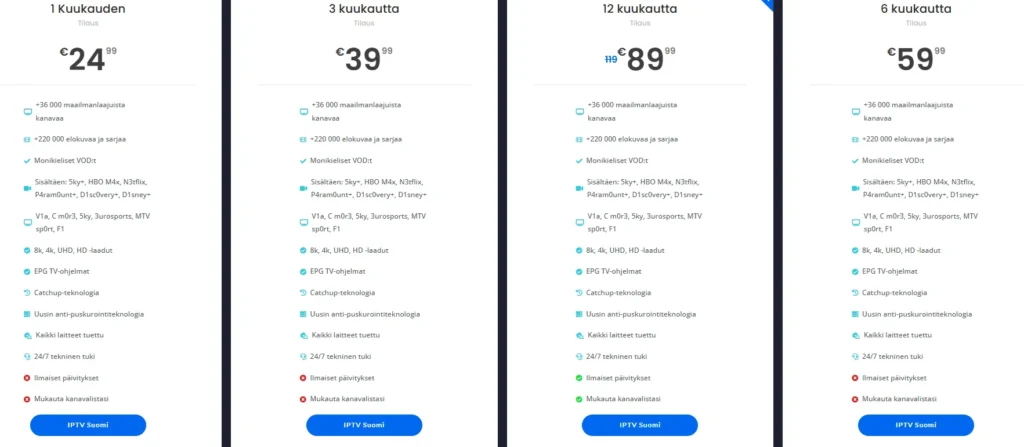
If you’re ready to enhance your IPTV experience and keep your IPTV M3U playlist updated, we invite you to explore our offerings. Visit our pricing page for more details, or if you have any questions, feel free to reach out via WhatsApp at this link. We’re here to help you every step of the way!
