 Skip to content

Why You Need to Update IPTV M3U Playlists Regularly
Keeping your IPTV M3U playlists updated is essential for a seamless viewing experience, especially in Finland where the demand for high-quality streaming is ever-increasing. Regular updates ensure that you have access to the latest channels and content, enhancing your overall IPTV experience. Below, we explore the common reasons playlists become outdated and the benefits of maintaining regular updates.

Common Reasons Playlists Become Outdated
- Channel Changes: IPTV providers frequently add or remove channels. If your playlist is not updated, you may miss out on new channels or find that some channels no longer work.
- Content Updates: New shows, movies, and live events are constantly being added. An outdated playlist may not reflect the latest offerings, leading to a less satisfying viewing experience.
- Technical Issues: Sometimes, links within the playlist can become broken or outdated due to server changes or maintenance. Regular updates help mitigate these issues.
Benefits of Regular Updates on Streaming Quality
- Access to IPTV New Channels: By updating your playlist, you gain access to the latest channels that may have been added since your last update. This is particularly important for sports events and live broadcasts.
- Improved Streaming Quality: An updated IPTV playlist refresh can lead to better streaming quality, reducing buffering and interruptions. This is crucial for enjoying live sports or high-definition movies.
- Enhanced User Experience: Regular updates ensure that you are using the most efficient links, which can improve load times and overall performance.
To keep your IPTV experience optimal, it’s recommended to perform an IPTV playlist update at least once a month or whenever you notice issues with your current playlist.
Step-by-Step Guide to Updating IPTV M3U Playlists
Updating your IPTV M3U playlist can be done easily with the right steps. Here’s a comprehensive guide to help you through the process:
Updating Playlists on Different Devices
Firestick
- Open the IPTV App: Launch your preferred IPTV app on your Firestick, such as IPTV Smarters Pro.
- Navigate to Settings: Go to the settings menu within the app.
- Add M3U URL: Select the option to add a new playlist and enter the updated M3U URL.
- Save Changes: Save the changes and restart the app to refresh the channel list.
Android
- Download IPTV M3U: Obtain the latest M3U playlist from your IPTV provider.
- Open Your IPTV Player: Use an app like GSE Smart IPTV or IPTV Smarters Pro.
- Load the Playlist: Go to the settings and load the new M3U file or URL.
- Confirm and Stream: Confirm the changes and start streaming.
Windows and Mac
- Download the M3U Playlist: Get the latest M3U playlist from your provider.
- Open VLC or Kodi: Launch your preferred media player.
- Load the Playlist: For VLC, go to ‘Media’ > ‘Open Network Stream’ and paste the M3U URL. For Kodi, use the PVR IPTV Simple Client to load the playlist.
- Enjoy Streaming: After loading, you can start enjoying your channels.
Manual vs Automated Update Methods
- Manual Updates: This involves regularly checking for new M3U links and entering them into your IPTV player. It’s straightforward but can be time-consuming.
- Automated Updates: Some IPTV services offer tools that automatically refresh your playlists. This is a convenient option for users who want to ensure they always have the latest content without manual intervention.
Tools and Apps for Managing and Updating IPTV M3U Playlists
Several applications can help you manage and update your IPTV playlists effectively:
- IPTV Smarters Pro: Known for its user-friendly interface, it allows easy updates and management of M3U playlists.
- VLC Media Player: A versatile player that supports M3U playlists and offers various features for streaming.
- GSE Smart IPTV: This app provides a robust platform for managing playlists and includes a built-in VOD library.
Frequently Asked Questions about IPTV M3U Playlists
- How do I update my IPTV M3U playlist?
- Follow the step-by-step guide provided above for your specific device.
- How often should I update IPTV M3U playlists?
- It’s recommended to update at least once a month or whenever you notice issues.
- Can I manually update IPTV playlists on my device?
- Yes, you can manually enter new M3U URLs into your IPTV player.
- What are the best apps for updating IPTV M3U playlists?
- Popular options include IPTV Smarters Pro, VLC Media Player, and GSE Smart IPTV.
- Is updating IPTV M3U playlists legal in Finland?
- Ensure that your IPTV provider has the necessary licenses to stream content legally.
Finding Reliable Movie IPTV M3U Playlists
Sources for Updated Movie IPTV M3U Channel Lists
When it comes to accessing movie IPTV M3U playlists, finding reliable sources is crucial for ensuring a smooth streaming experience. Here are some of the best places to find updated movie IPTV channel lists:
- Official IPTV Providers: Many IPTV service providers offer curated movie playlists that include a variety of channels dedicated to films and on-demand content. For instance, Pro IPTV Suomi provides access to a wide range of movie channels, ensuring that fans can catch all the latest releases.
- Online IPTV Communities: Various online forums and communities dedicated to IPTV often share updated movie IPTV playlists. These can be a great resource for finding free or paid lists, but users should exercise caution and verify the legality of the sources.
- Dedicated IPTV Websites: Some websites specialize in providing M3U playlists specifically for movies. These sites often categorize channels by genre, making it easier for users to find what they are looking for. Look for sites that offer regular updates to ensure you have access to the latest channels.
- Social Media Groups: Platforms like Facebook and Reddit have groups where users share their experiences and resources related to movie IPTV. Joining these groups can provide access to shared playlists and tips on how to use them effectively.
Free vs Paid Movie IPTV Playlists: What You Need to Know
When considering movie IPTV M3U playlists, users often face the choice between free and paid options. Each has its pros and cons:
- Free Movie IPTV Playlists:
- Pros:
- No cost involved, making it accessible for everyone.
- Often includes a wide variety of channels, including international movie options.
- Cons:
- May not be reliable; channels can go offline without notice.
- Quality of streams can vary significantly.
- Legal issues may arise if the content is not authorized.
- Paid Movie IPTV Playlists:
- Pros:
- Generally more reliable with consistent updates and better quality streams.
- Often includes customer support and troubleshooting assistance.
- Legal and authorized content, reducing the risk of legal issues.
- Cons:
- Monthly or yearly subscription fees can add up.
- Limited options if the provider does not offer a wide range of channels.
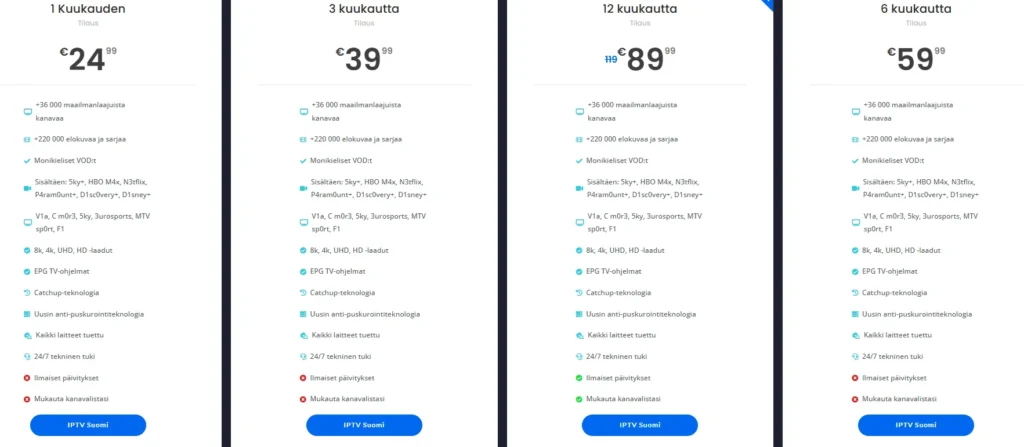
For those looking for a comprehensive Finland TV channels list, paid options are often recommended for a better viewing experience. However, free lists can be a good starting point for those new to IPTV.
How to Load Movie IPTV M3U Playlists on Your Device
Once you have obtained your movie IPTV M3U playlist, the next step is to load it onto your device. Here’s a quick guide on how to do this for various platforms:
- Loading Movie IPTV M3U Playlists on Firestick:
- Install a compatible IPTV player like IPTV Smarters Pro.
- Open the app and select the option to add a new playlist.
- Enter the M3U URL or upload the movie IPTV playlist file.
- Setting Up Movie IPTV Lists on Android and Smart TVs:
- Download an IPTV app from the Google Play Store or your TV’s app store.
- Open the app and navigate to the settings or playlist section.
- Input the M3U URL or upload the file to access the channels.
- Using Movie IPTV M3U Playlists on Windows and Mac:
- Download an IPTV player compatible with your operating system.
- Open the player and look for the option to add a playlist.
- Enter the M3U URL or upload the movie IPTV playlist file.
For more detailed instructions, you can refer to our installation guide.
Popular Movie Channels Accessible via IPTV M3U
When exploring Finnish IPTV channels, viewers should look for channels that cater to local movie interests. Here are some popular IPTV cinema channels to consider:
- Local Finnish Movie Channels: These channels often feature Finnish films, documentaries, and local cinema.
- International Movie Channels: Access to popular global networks that provide diverse content, including Hollywood blockbusters and independent films.
- Genre-Specific Channels: Channels dedicated to specific genres, such as action, drama, or horror, allowing viewers to find their preferred content easily.
For a comprehensive list of channels, visit Pro IPTV Suomi, where you can find curated lists tailored for Finnish viewers.
By understanding where to find movie IPTV M3U playlists and how to load them onto your devices, you can enhance your viewing experience and enjoy a wide range of movie content tailored to your preferences.
Troubleshooting Common Issues with Movie IPTV M3U
Fixing Buffering and Playback Problems
When using movie IPTV M3U playlists, users may encounter buffering and playback issues that can disrupt their viewing experience. Here are some effective troubleshooting tips to help you resolve these common problems:
- Check Your Internet Connection:
- A stable and fast internet connection is crucial for smooth streaming. Ensure your connection speed is at least 10 Mbps for optimal performance, especially when streaming in high definition or 4K.
- You can test your internet speed using various online speed test tools to confirm that your connection is sufficient for streaming.
- Restart Your Device:
- Sometimes, a simple restart can resolve buffering issues. Unplug your streaming device (like Firestick or Smart TV) from the power source, wait for about 30 seconds, and then plug it back in.
- Close Background Applications:
- If you have multiple applications running in the background, they may consume bandwidth and resources. Close any unnecessary apps to free up memory and improve performance.
- Adjust Streaming Quality:
- Many IPTV players allow you to adjust the streaming quality. Lowering the quality can help reduce buffering, especially if your internet connection is not optimal. Look for options in the settings menu of your IPTV player.
- Update Your IPTV Player:
- Ensure that your IPTV player, such as IPTV Smarters Pro or VLC Media Player, is updated to the latest version. Updates often include performance improvements and bug fixes that can enhance your streaming experience.
- Clear Cache:
- Clearing the cache of your IPTV player can help improve performance. Go to the settings of your IPTV app and look for the option to clear cache or data.
- Use a Wired Connection:
- If possible, connect your streaming device to the internet using an Ethernet cable instead of relying on Wi-Fi. This can provide a more stable connection and reduce buffering.
Keeping Your M3U Playlists Updated
To ensure a seamless streaming experience with movie IPTV M3U, it’s essential to keep your playlists updated. Here’s how to do it effectively:
- Regularly Check for Updates:
- Stay in touch with your IPTV service provider for any updates to your M3U playlist URL. Providers often update their playlists to include new channels or remove inactive ones.
- Update Your M3U URL:
- If you receive a new M3U URL, you can easily update your existing playlist in your IPTV player. Open the player, navigate to the playlist settings, and replace the old URL with the new one.
- Add New Channels:
- If you find new channels that you want to add, you can do so by entering their M3U URLs into your player. Most IPTV players allow you to add multiple playlists, so you can keep your content diverse.
- Organize Your Playlists:
- Consider organizing your playlists by categories (e.g., Movies, Series, Documentaries) to make navigation easier. This can enhance your viewing experience by allowing you to find your favorite channels quickly.
- Backup Your Playlists:
- Regularly back up your M3U playlists to avoid losing them due to accidental deletions or changes. You can save the URLs in a document or use a playlist management tool.
Using VPN for Improved Access and Security
Using a VPN (Virtual Private Network) can enhance your experience with movie IPTV M3U playlists by providing additional security and access to geo-restricted content. Here’s how to effectively use a VPN:
- Choose a Reliable VPN Provider: Select a reputable VPN service that offers fast speeds and strong encryption. Look for providers that have a good track record with streaming services.
- Connect to a Nearby Server: For optimal performance, connect to a VPN server that is geographically close to your location. This can help reduce latency and improve streaming quality.
- Avoid Free VPNs: While free VPNs may seem appealing, they often come with limitations such as slower speeds, data caps, and potential security risks. Investing in a paid VPN service is usually worth it for a better experience.
- Check for IP and DNS Leaks: Ensure that your VPN is not leaking your real IP address or DNS requests. You can use online tools to check for leaks and confirm that your VPN is functioning correctly.
By following these troubleshooting tips and maintaining your movie IPTV M3U playlists, you can enjoy a seamless and enjoyable streaming experience. Whether you’re watching the latest blockbusters or classic films, having the right setup will ensure you never miss a moment of entertainment.
For more information on IPTV channels and services, visit Pro IPTV Suomi. If you need assistance with installation or have questions about managing your playlists, check out our installation guide or contact us directly via WhatsApp at this link.
With the right tools and knowledge, you can fully enjoy the vast array of movies available through IPTV M3U playlists.
Update IPTV M3U Playlist: A Comprehensive Guide
Keeping your IPTV M3U playlist updated is essential for a seamless viewing experience, especially in Finland where the demand for high-quality streaming is ever-increasing. Regular updates ensure that you have access to the latest channels and content, enhancing your overall IPTV experience. Below, we explore the common reasons playlists become outdated and the benefits of maintaining regular updates.
Why You Need to Update IPTV M3U Playlists Regularly
Common Reasons Playlists Become Outdated
- Channel Changes: IPTV providers frequently add or remove channels. If your playlist is not updated, you may miss out on new channels or find that some channels no longer work.
- Content Updates: New shows, movies, and live events are constantly being added. An outdated playlist may not reflect the latest offerings, leading to a less satisfying viewing experience.
- Technical Issues: Sometimes, links within the playlist can become broken or outdated due to server changes or maintenance. Regular updates help mitigate these issues.
Benefits of Regular Updates on Streaming Quality
- Access to IPTV New Channels: By updating your playlist, you gain access to the latest channels that may have been added since your last update. This is particularly important for sports events and live broadcasts.
- Improved Streaming Quality: An updated IPTV playlist refresh can lead to better streaming quality, reducing buffering and interruptions. This is crucial for enjoying live sports or high-definition movies.
- Enhanced User Experience: Regular updates ensure that you are using the most efficient links, which can improve load times and overall performance.
To keep your IPTV experience optimal, it’s recommended to perform an IPTV playlist update at least once a month or whenever you notice issues with your current playlist.
Conclusion: The Importance of Updating Your IPTV M3U Playlist
In conclusion, regularly updating your IPTV M3U playlist is crucial for ensuring a seamless and enjoyable streaming experience. Here are the key benefits of keeping your playlists current:
- Access to the Latest Channels: Regular updates ensure that you have access to new channels and content, allowing you to enjoy the latest programming without interruptions.
- Improved Streaming Quality: An updated playlist can enhance streaming quality, reducing buffering and playback issues, which is essential for enjoying live sports or high-definition movies.
- 24/7 Support: Our dedicated support team is available around the clock to assist you with any questions or issues you may encounter, providing peace of mind as you navigate your IPTV options.
- Comprehensive Setup Guides: Our detailed guides make it easy to update your IPTV M3U playlists on various devices, including Firestick, Android, Windows, and Mac, ensuring you can start streaming quickly.
If you’re ready to enhance your IPTV experience and keep your IPTV M3U playlist updated, we invite you to explore our offerings. Visit our pricing page for more details, or if you have any questions, feel free to reach out via WhatsApp at this link. We’re here to help you every step of the way!
