 Skip to content
Understanding IPTV Devices: What You Need to Know
What is an IPTV Device?
An IPTV device is a specialized tool that allows users to stream television content over the internet. Unlike traditional cable or satellite services, IPTV (Internet Protocol Television) delivers programming through a broadband connection, enabling viewers to access a wide array of channels and on-demand content. The functionality of these devices is straightforward: they decode the digital signals received via the internet and display them on your screen, whether it be a TV, computer, or mobile device.
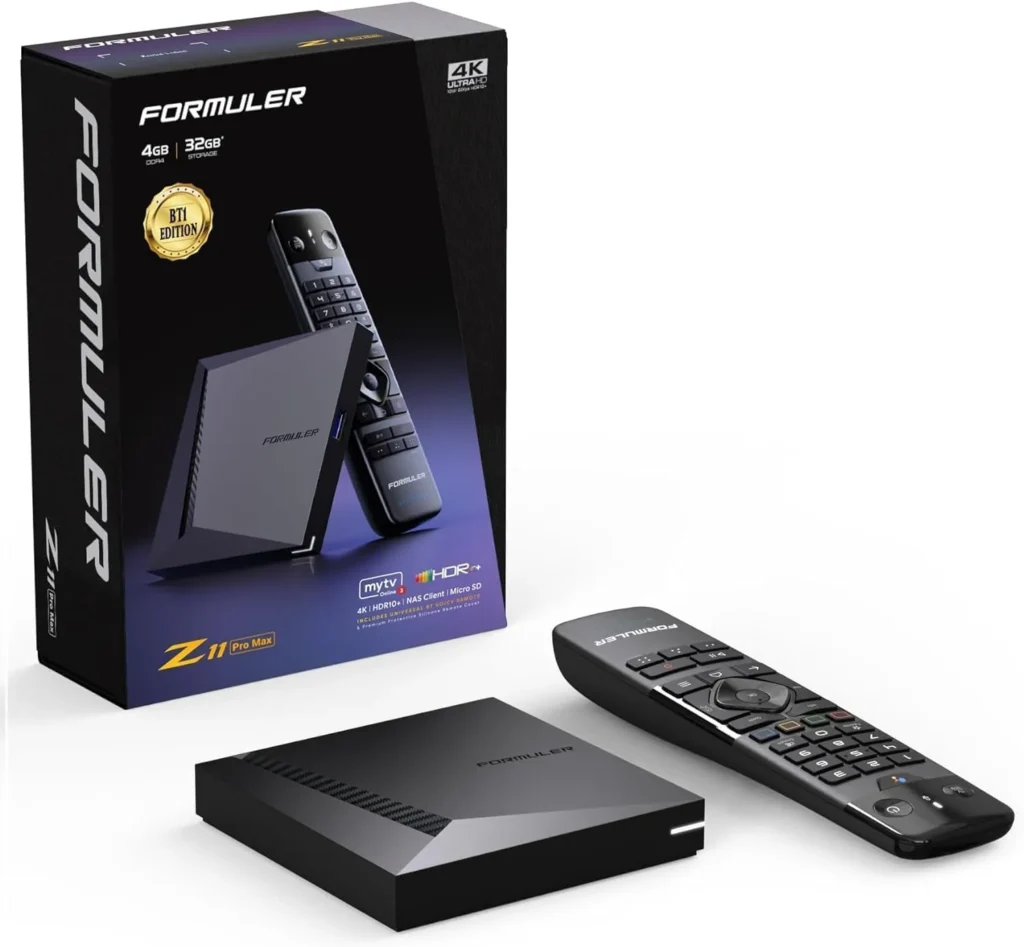
IPTV devices work by utilizing your internet connection to stream content in real-time. This means that as long as you have a stable internet connection, you can enjoy live TV, movies, and series without the need for physical media. The technology behind IPTV allows for features such as time-shifting, where you can pause, rewind, or record live broadcasts, enhancing the viewing experience significantly.
Types of IPTV Devices Available
When it comes to IPTV devices, there are several options available, each with its own set of advantages. Here’s a comparison of the most common types:
- Smart TVs: Many modern televisions come with built-in IPTV capabilities. This means you can download IPTV apps directly onto your TV, making it a convenient option for users who prefer a seamless experience without additional hardware.
- Set-Top Boxes: Devices like Roku, Amazon Fire TV Stick, and Android TV boxes are popular choices for IPTV. They connect to your TV via HDMI and provide a user-friendly interface for accessing IPTV services. These devices often support a wide range of applications, including those for streaming services.
- Computers: Using an IPTV computer setup allows for flexibility and customization. You can install various IPTV software applications that cater to your viewing preferences. This option is particularly beneficial for users who enjoy watching content on larger screens or multitasking while streaming.
- Mobile Devices: Smartphones and tablets can also serve as IPTV devices. With the right applications, you can watch your favorite shows and channels on the go, making it a versatile option for busy lifestyles.
Advantages of Using Dedicated IPTV Devices
While you can technically use any internet-connected device to access IPTV services, dedicated IPTV devices offer several advantages:
- User Experience: Set-top boxes and smart TVs often come with optimized interfaces designed specifically for streaming, making navigation easier.
- Performance: Dedicated devices typically have better processing power and memory, which can lead to smoother streaming experiences compared to using a standard computer.
- Compatibility: Many IPTV devices are designed to work seamlessly with various IPTV services, ensuring you have access to the latest features and updates.
In conclusion, choosing the right IPTV device can significantly enhance your viewing experience. Whether you opt for a smart TV, a set-top box, or even an IPTV for PC setup, each option has its unique benefits that cater to different user preferences. For more information on how IPTV works and to explore the best devices for your needs, check out our detailed guide on how IPTV works.
By understanding the various types of IPTV devices available, you can make an informed decision that aligns with your viewing habits and preferences. If you’re ready to dive into the world of IPTV, consider exploring our extensive channel offerings and subscription plans at Pro IPTV Suomi.
Setting Up Your IPTV Device for Optimal Performance
Step-by-Step Guide to Setting Up IPTV on Your Device
Setting up your IPTV device is crucial for ensuring a smooth and enjoyable streaming experience. Whether you are using a smart TV, a set-top box, or a computer, the setup process can vary slightly. Here’s a comprehensive guide to help you get started:
- Choose Your IPTV Device: Decide whether you will use a smart TV, a set-top box, or an IPTV for PC setup. Each option has its own advantages, so choose one that fits your viewing habits.
- Connect to the Internet: Ensure your device is connected to a stable internet connection. For optimal performance, a wired connection is recommended, but Wi-Fi can also work if the signal is strong.
- Download the IPTV App:
- For smart TVs, navigate to your app store and search for your preferred IPTV application.
- For set-top boxes, follow the same process as smart TVs.
- For computers, download IPTV software that supports your service.
- Enter Your Subscription Details: Once the app is installed, open it and enter your IPTV subscription credentials. This usually includes a username and password provided by your IPTV service provider.
- Configure Settings: Adjust the settings within the app to optimize your viewing experience. This may include setting up parental controls, adjusting video quality, and selecting your preferred language.
- Start Streaming: After configuration, you should be ready to start streaming. Browse through the available channels and enjoy your content!
Common Troubleshooting Tips
- Connection Issues: If you experience buffering or connection problems, check your internet speed. A minimum of 10 Mbps is recommended for HD streaming.
- App Crashes: If the app crashes frequently, try reinstalling it or checking for updates.
- Channel Availability: Ensure that your subscription is active and that you have access to the channels you want to watch.
By following these steps, you can set up your IPTV device effectively and enjoy a wide range of content. For more detailed information on troubleshooting and setup, visit our IPTV installation guide.
Best Practices for Streaming with IPTV Devices
To enhance your IPTV experience, consider the following best practices:
- Internet Speed: Ensure you have a reliable internet connection. For standard definition, a speed of 5 Mbps is sufficient, while HD content requires at least 10 Mbps. For 4K streaming, aim for 25 Mbps or higher.
- Wired vs. Wireless: Whenever possible, use a wired connection to reduce latency and improve streaming quality. If using Wi-Fi, position your router close to your IPTV device to minimize interference.
- Regular Updates: Keep your IPTV app and device firmware updated to benefit from the latest features and security enhancements.
- Use a VPN: If you encounter geo-restrictions, consider using a VPN to access content that may not be available in your region.
- Optimize Your Viewing Environment: Ensure your viewing area is comfortable and free from distractions. A good sound system can also enhance your overall experience.
By implementing these best practices, you can ensure that your IPTV device operates at its best, providing you with a seamless streaming experience. For more insights on the best IPTV services and devices, check out our reviews page.
In conclusion, setting up your IPTV device correctly and following best practices can significantly enhance your viewing experience. Whether you choose to watch on a smart TV, a set-top box, or a computer, the right setup will allow you to enjoy a vast array of channels and on-demand content. If you have any questions or need assistance, feel free to reach out via WhatsApp for immediate support.
Exploring IPTV Options for PC and Other Devices
How to Use IPTV on Your Computer
Using an IPTV device on your computer is a fantastic way to enjoy a wide range of television channels and on-demand content. The flexibility of a PC allows for a customizable viewing experience, making it an appealing option for many users. Here’s how to get started with IPTV on your computer:
- Choose Your IPTV Software: There are several applications available for streaming IPTV on your computer. Popular options include VLC Media Player, Kodi, and specific IPTV apps that can be downloaded from the internet. Each of these applications has its own set of features, so choose one that best fits your needs.
- Install the Software: Download and install your chosen IPTV application. Ensure that you are downloading from a reputable source to avoid malware or other security issues.
- Obtain Your IPTV Subscription: To access IPTV channels, you will need a subscription from a service provider. Pro IPTV Suomi offers a wide selection of channels and video-on-demand content, making it a great choice for Finnish audiences. You can explore their offerings and subscription plans here.
- Input Your M3U Link: Most IPTV services provide an M3U link, which is a playlist that contains the channels you can access. Open your IPTV application and look for the option to add a new playlist or stream. Paste the M3U link into the designated field.
- Start Streaming: Once you have added the playlist, you should be able to browse through the available channels and start streaming your favorite shows and movies.
Benefits of Using IPTV on a Computer
- Larger Screen: Watching on a computer allows for a larger display compared to mobile devices, enhancing the viewing experience.
- Multitasking: You can easily switch between applications, making it convenient to browse the internet or work while streaming.
- Customization: With a computer, you can customize your viewing experience by adjusting settings, installing additional plugins, or using multiple screens.
Using an IPTV for PC setup not only provides flexibility but also allows for a more personalized viewing experience. For more information on how to set up IPTV on your computer, check out our detailed guide on how IPTV works.
Compatibility of IPTV with Various Devices
One of the significant advantages of IPTV is its compatibility with a wide range of devices. Here’s a list of devices that can seamlessly work with IPTV services:
- Smart TVs: Many modern smart TVs come with built-in IPTV applications, allowing you to stream directly without additional hardware.
- Set-Top Boxes: Devices like Roku, Amazon Fire TV Stick, and Android TV boxes are popular choices for IPTV streaming. They provide a user-friendly interface and support various IPTV applications.
- Computers: As discussed, computers can run IPTV software, offering a customizable and flexible viewing experience.
- Mobile Devices: Smartphones and tablets can also be used for IPTV streaming. With the right apps, you can watch your favorite shows on the go.
- Gaming Consoles: Some gaming consoles also support IPTV applications, allowing you to enjoy content on your gaming setup.
Discussion on the Flexibility of Using IPTV Across Different Platforms
The flexibility of IPTV is one of its most appealing features. Users can switch between devices based on their preferences and circumstances. For instance, you might prefer watching on a smart TV in your living room for a family movie night, while using your computer for personal viewing during the day. This adaptability ensures that you can enjoy your favorite content wherever you are.
Moreover, many IPTV services, including Pro IPTV Suomi, offer cross-platform compatibility, meaning you can start watching on one device and continue on another without losing your place. This feature is particularly useful for users who are always on the move.
In conclusion, exploring IPTV options for your computer and other devices opens up a world of entertainment possibilities. Whether you choose to watch on a PC, smart TV, or mobile device, the flexibility and variety of IPTV services can cater to your viewing preferences. For more insights into the best IPTV services and devices, visit our reviews page and discover what Pro IPTV Suomi has to offer.
If you have any questions or need assistance with your IPTV setup, don’t hesitate to reach out via WhatsApp for immediate support. Enjoy your streaming experience!
Why Choose Pro IPTV Suomi for Your IPTV Needs
Extensive Channel Selection and Quality Content
When it comes to selecting an IPTV device, one of the most critical factors to consider is the content available through the service. Pro IPTV Suomi stands out in the market by offering an impressive selection of over 36,000 channels. This extensive library includes not only local Finnish programming but also a wide array of international content, ensuring that there is something for everyone.
The channels available cover various genres, including:
- Sports: Enjoy live broadcasts of your favorite sports events.
- Movies and Series: Access a vast collection of films and TV shows, including the latest releases.
- Documentaries: Explore educational content across multiple subjects.
- Children’s Programming: Keep the little ones entertained with a variety of kid-friendly channels.
In addition to live TV, Pro IPTV Suomi also offers video-on-demand (VOD) services, allowing subscribers to watch movies and series at their convenience. This feature is particularly beneficial for those with busy schedules who may not always be able to watch live broadcasts. With such a diverse range of content, Pro IPTV Suomi ensures that users can tailor their viewing experience to their preferences.
Affordable Subscription Plans and Promotions
Affordability is another significant advantage of choosing Pro IPTV Suomi. The service offers competitive subscription pricing, with a monthly plan starting at just €23. This pricing structure makes it accessible for a wide range of viewers, from casual watchers to avid fans of various genres.
Moreover, Pro IPTV Suomi frequently runs promotions and special offers, providing additional value to subscribers. By taking advantage of these deals, users can enjoy high-quality IPTV services without breaking the bank.
Here’s a quick breakdown of the subscription options:
| Plan Type | Price | Features |
|---|---|---|
| Monthly Subscription | €23 | Access to over 36,000 channels and VOD content |
| Annual Subscription | Varies | Potential discounts and additional perks |
Choosing Pro IPTV Suomi not only gives you access to a vast array of channels but also ensures that you receive quality content at an affordable price. For more details on subscription plans and to explore the available options, visit our plans page.

In conclusion, Pro IPTV Suomi is an excellent choice for anyone looking to enhance their IPTV experience. With an extensive channel selection, quality content, and affordable pricing, it caters to the diverse needs of Finnish audiences. If you’re ready to dive into the world of IPTV, consider subscribing today and enjoy the benefits of high-quality streaming. For any inquiries or assistance, feel free to reach out via WhatsApp for immediate support.
By choosing Pro IPTV Suomi, you are not just selecting an IPTV service; you are investing in a comprehensive entertainment solution that meets your viewing needs.
Frequently Asked Questions About IPTV Devices
What Channels Are Available with IPTV in Finland?
When considering an IPTV device, one of the most common questions is about the channels available. Pro IPTV Suomi offers an extensive selection of over 36,000 channels, catering to a wide range of interests and preferences. Here’s a breakdown of some popular categories you can expect:
Local Finnish Channels: Enjoy a variety of local programming, including news, entertainment, and cultural shows that resonate with Finnish audiences.
International Channels: Access channels from around the globe, providing diverse content that includes news, sports, and entertainment from various countries.
Sports Channels: For sports enthusiasts, Pro IPTV Suomi includes channels that broadcast live sports events, ensuring you never miss a game.
Movies and Series: With a vast library of films and TV series, subscribers can enjoy on-demand content at their convenience.
Children’s Programming: A selection of kid-friendly channels is available, making it easy for families to find suitable content for younger viewers.
This extensive channel lineup ensures that there is something for everyone, whether you are a sports fan, a movie buff, or looking for family-friendly programming. For a complete list of channels available, visit our channel offerings page.
Is IPTV Legal in Finland?
Another frequently asked question regarding IPTV devices is the legality of IPTV services in Finland. The good news is that IPTV is legal in Finland, provided that the service complies with local regulations and licensing requirements. Pro IPTV Suomi operates within the legal framework, ensuring that all content provided is licensed and authorized for distribution.
It’s essential to choose a reputable IPTV provider like Pro IPTV Suomi to ensure that you are accessing content legally. This not only protects you as a consumer but also supports the creators and distributors of the content you enjoy. For more information on the legality of IPTV services and how they operate, check out our detailed guide on how IPTV works.
Conclusion: Making the Right Choice for Your IPTV Experience
When it comes to selecting the best IPTV device, understanding your options and the services available is essential for an optimal viewing experience. Pro IPTV Suomi stands out as a premier choice for IPTV services in Finland, offering a comprehensive selection of over 36,000 channels that cater to diverse interests. Whether you are a fan of local Finnish programming, international content, or on-demand movies and series, Pro IPTV Suomi has something for everyone.
Final Thoughts on Choosing the Best IPTV Device
Choosing the right IPTV device can significantly enhance your entertainment experience. Here are some key points to consider:
- Variety of Content: Pro IPTV Suomi provides access to a wide range of channels, including sports, movies, and children’s programming, ensuring that all family members can find something they enjoy.
- User-Friendly Experience: With options like smart TVs, set-top boxes, and computers, you can select a device that fits your lifestyle and viewing preferences. Each device offers unique advantages, from the convenience of a smart TV to the flexibility of using an IPTV for PC setup.
- Affordability: With subscription plans starting at just €23 per month, Pro IPTV Suomi offers competitive pricing that makes high-quality IPTV services accessible to a broad audience.
Strong Call to Action
If you’re ready to elevate your viewing experience, consider subscribing to Pro IPTV Suomi today. With affordable plans and an extensive channel lineup, you can enjoy high-quality streaming that fits your needs. For more details on subscription options and to explore the available packages, visit our plans page.
For any questions or assistance with your IPTV setup, don’t hesitate to reach out via WhatsApp for immediate support. Embrace the future of television with Pro IPTV Suomi and enjoy a world of entertainment at your fingertips!
In conclusion, making the right choice for your IPTV device and service can transform your viewing habits, providing you with a rich array of content and a seamless streaming experience. Don’t miss out on the opportunity to explore the best IPTV services available in Finland. Start your journey with Pro IPTV Suomi today!
